Organization settings
阅读需 1 分钟
Change your organization's general settings under Settings → General. You need the Manage settings permission.
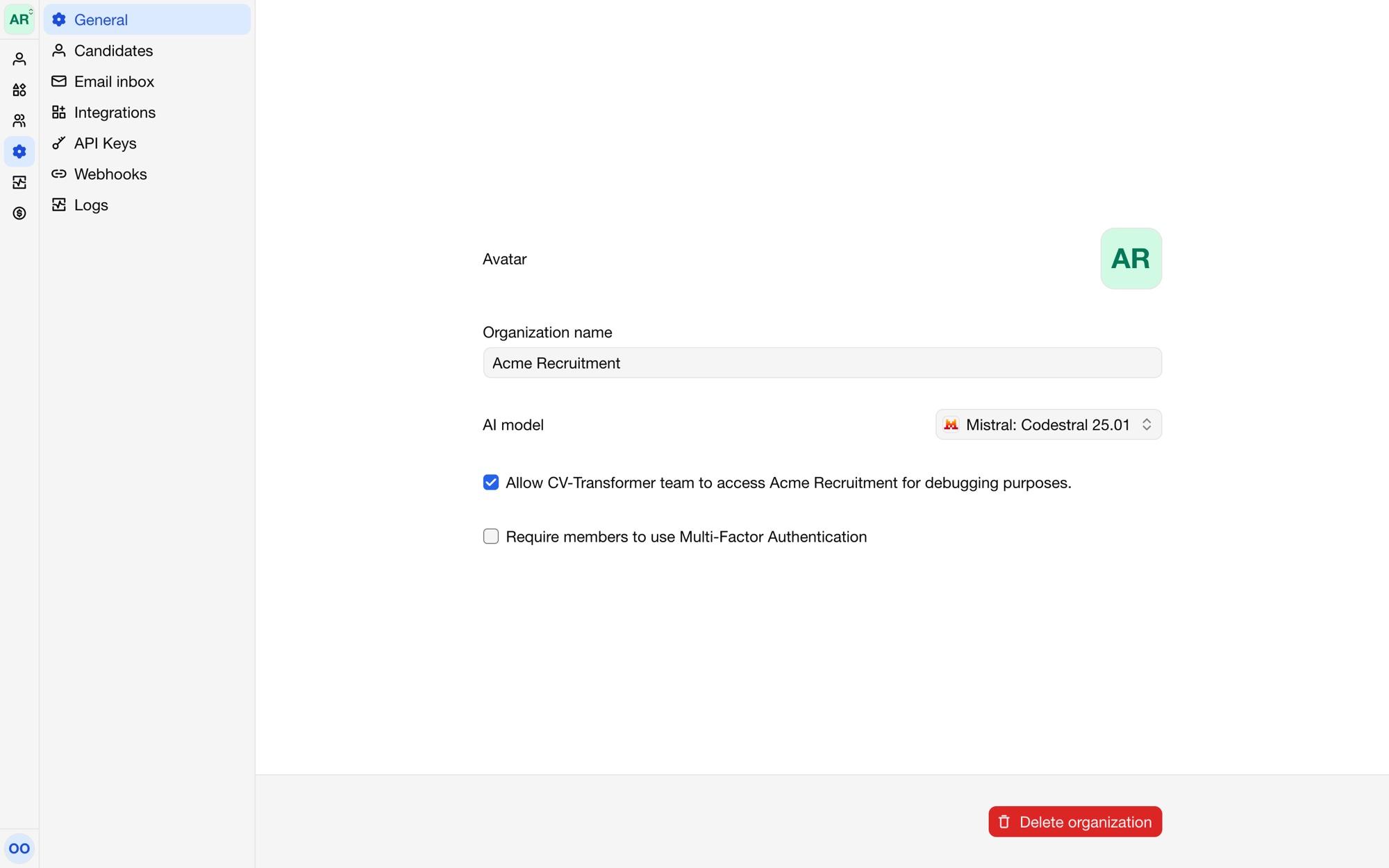
Name and avatar
The Organization name and Avatar show in CV-Transformer, and on proposals when Proposal by is set to the organization (see Proposal reactions).
AI model
Choose the AI model that fills in and edits candidates. Each model shows who makes it and which providers run it. Models differ in speed, quality and where they run; the default works well for most teams.
Security
Require members to use Multi-Factor Authentication: members must set up a second sign-in step before they can open the organization.
Allow CV-Transformer team to access the organization for debugging purposes: lets our support team look into a problem in your organization. Turn it off when you don't need help.
Other settings
Candidates: the default prompt, language detection, proposal settings and automatic deletion. See Editing with AI, Proposal reactions and Retention and deletion.
Inbox: the email address for CVs. See Email inbox.
Integrations: your ATS. See Integrations.
API keys and Webhooks: for developers. See the API reference and Webhooks.
Logs: see Logs.
Deleting the organization
Delete organization deletes the organization with its candidates and layouts. It can't be undone. If you have a subscription, cancel it first under Billing.